General Calculation Analysis
The General calculation analysis workflow provides a quick status and summary check for a completed, running, or incomplete VASP or Quantum ESPRESSO calculation.
It is available from:
VQkit
 -> Post-processing
 -> [1] General calculation analysis
The purpose of this workflow is to answer a few immediate questions:
Which electronic-structure code is present in the current directory?
What type of calculation does VQkit detect?
Is the calculation complete, converged, failed, or still incomplete?
What is the latest total energy?
What is the Fermi level, when available?
This page is a reference for the summary workflow. More specialized analysis such as DOS, band structure, work function, charge analysis, AIMD, NEB, and mechanical properties is handled by the corresponding Post-processing modules.
Example
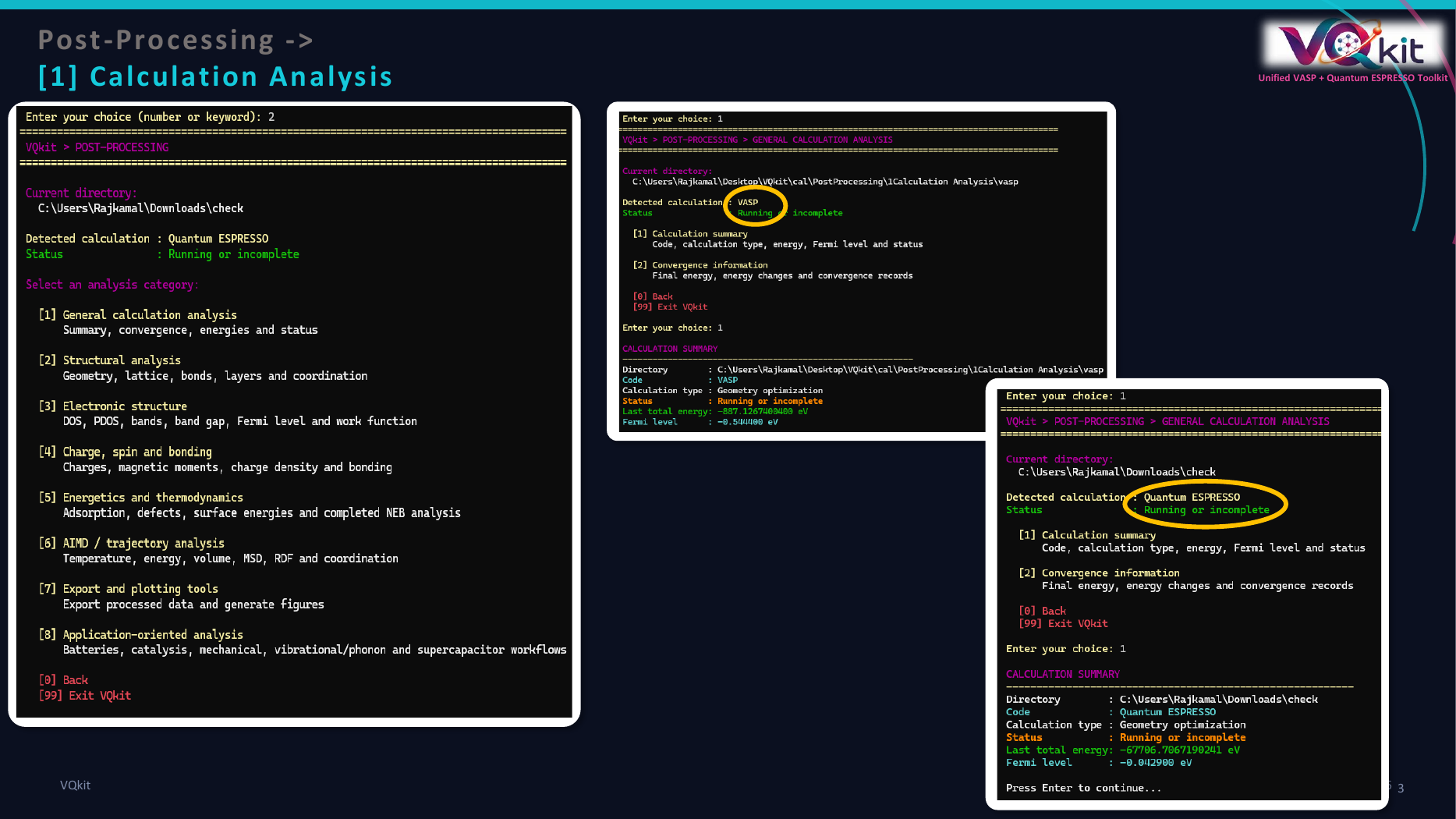
The visual guide shows VQkit identifying VASP and Quantum ESPRESSO calculations and reporting their status through a common interface.
Basic workflow
Step 1 — Enter the calculation directory
Start VQkit in the directory containing the calculation files.
For VASP this may contain files such as:
INCAR
POSCAR
KPOINTS
POTCAR
OUTCAR
OSZICAR
DOSCAR
For Quantum ESPRESSO this may contain files such as:
scf.in
scf.out
relax.in
relax.out
tmp/
Step 2 — Open Post-processing
Choose:
[2] Post-processing
Step 3 — Choose General calculation analysis
Choose:
[1] General calculation analysis
VQkit inspects the current working directory automatically.
No additional input file needs to be specified for the normal summary workflow.
Information reported
The current report includes:
Directory
Code
Calculation type
Status
Last total energy
Fermi level
A typical report has the form:
CALCULATION SUMMARY
----------------------------------------------------------

Directory        : /path/to/calculation
Code             : VASP
Calculation type : Geometry optimization
Status           : Completed
Last total energy: -123.4567890000 eV
Fermi level      : 4.823100 eV
Code detection
VQkit automatically checks the working directory for signatures of:
VASP;
Quantum ESPRESSO;
both;
neither.
VASP detection
VQkit recognizes common VASP files such as:
INCAR
POSCAR
KPOINTS
POTCAR
OUTCAR
OSZICAR
vasprun.xml
CONTCAR
EIGENVAL
DOSCAR
PROCAR
CHGCAR
If one or more of these markers are present, VASP may be detected.
Quantum ESPRESSO detection
VQkit inspects *.in files for QE-style content such as:
&CONTROL
&SYSTEM
calculation = ...
It also checks output files such as:
*.out
*.pw.out
for QE signatures including:
Quantum ESPRESSO
Program PWSCF
JOB DONE
Possible code labels
The detected code can be:
VASP
Quantum ESPRESSO
Mixed
Unknown
Mixed means VQkit detected both VASP and QE-style files in the same
directory.
For production analysis, keeping calculations from different codes in separate directories is recommended because it makes automatic interpretation unambiguous.
Calculation-type detection
VQkit attempts to identify the calculation type from the available input settings.
VASP calculation types
The current detector can recognize common cases such as:
Static / SCF
Geometry optimization
DOS / electronic structure
Band structure
AIMD
NEB
Static / SCF
If no stronger calculation-specific marker is detected, VASP is normally classified as:
Static / SCF
Geometry optimization
A relaxation is inferred when ionic steps are active, for example when:
NSW > 0
and IBRION indicates ionic optimization.
AIMD
AIMD is recognized when the INCAR contains the molecular-dynamics pattern:
IBRION = 0
with active ionic steps.
NEB
VQkit recognizes NEB-related INCAR settings such as:
IMAGES
LCLIMB
Band structure
A VASP band calculation may be detected from markers such as:
ICHARG = 11
or a line-mode KPOINTS file.
DOS / electronic structure
DOS-type calculations may be identified from settings such as:
NEDOS
LORBIT
Quantum ESPRESSO calculation types
VQkit reads QE calculation settings and can classify common workflows as:
SCF
NSCF / DOS
Geometry optimization
Variable-cell optimization
Band structure
AIMD
Examples
SCF:
calculation = 'scf'
Geometry optimization:
calculation = 'relax'
Variable-cell optimization:
calculation = 'vc-relax'
NSCF:
calculation = 'nscf'
Band structure:
calculation = 'bands'
Molecular dynamics:
calculation = 'md'
or:
calculation = 'vc-md'
VASP status detection
For VASP, the summary primarily checks OUTCAR.
Completed
A calculation is identified as:
Completed
when the OUTCAR contains the normal VASP final timing/accounting section:
General timing and accounting informations for this job
This indicates that VASP reached its normal finalization stage.
Converged / finalization not detected
If VQkit finds:
reached required accuracy
but does not find the final timing block, the status may be reported as:
Converged / finalization not detected
This can occur when the ionic/electronic convergence target was reached but the output does not contain the expected normal termination marker.
Running or incomplete
If an OUTCAR exists but neither completion marker is found, VQkit reports:
Running or incomplete
This can indicate:
a job still running;
a terminated calculation;
an incomplete copy of the output;
a calculation stopped before normal finalization.
No completed calculation detected
If no usable completed-output information is present, VQkit can report:
No completed calculation detected
Quantum ESPRESSO status detection
QE status detection uses both:
saved XML metadata when available;
textual
pw.xoutput.
The XML information has priority for completion health when it is available.
QE XML sources
VQkit searches locations such as:
<outdir>/<prefix>.save/data-file-schema.xml
<outdir>/<prefix>.save/data-file.xml
<prefix>.xml
The exact source depends on the QE version and calculation layout.
XML completion status
If the XML contains:
exit_status = 0
VQkit reports:
Completed
A non-zero exit status is interpreted as:
Failed
If the XML exists but cannot be parsed, the status may be:
Corrupted XML
QE text-output status
When inspecting QE output, VQkit looks for common markers.
Completed:
JOB DONE
Failed:
Error in routine
or:
stopping ...
If no completion/failure marker is found but a QE output exists:
Running or incomplete
Input/output association
When several QE files are present, VQkit tries to associate a recent output with its corresponding input.
For example:
scf.in
scf.out
or:
relax.in
relax.out
If a matching pair is found, VQkit uses that input to identify values such as:
prefix;outdir;pseudo_dir.
If no directly matching input is found, VQkit searches available *.in
files for a valid QE &CONTROL / &SYSTEM structure.
VASP total-energy extraction
VQkit first tries to read the last VASP:
free energy TOTEN = ...
from:
OUTCAR
If that value is unavailable, it falls back to:
OSZICAR
and searches for the last:
F = ...
value.
The reported VASP energy is expressed in:
eV
Example:
Last total energy: -214.5837291000 eV
Meaning of the VASP energy
For VASP, the reported value is the latest total/free energy parsed from the available run output.
For geometry optimization or AIMD, this is the energy of the final available ionic step rather than an average over the trajectory.
Quantum ESPRESSO total-energy extraction
For QE, VQkit searches for the most recent total-energy line:
! total energy = ... Ry
The value is converted from Rydberg to electronvolts using:
Therefore the summary displays QE and VASP total energies using the same final unit:
eV
This provides a common reporting interface, but energies from different codes or different pseudopotentials should not be compared casually without a consistent computational setup.
VASP Fermi-level extraction
For VASP, VQkit first searches OUTCAR for:
E-fermi : ...
If an OUTCAR Fermi level is not found, VQkit can try:
DOSCAR
through the VQkit DOSCAR parser.
The final value is reported in:
eV
Quantum ESPRESSO Fermi-level extraction
For QE, VQkit recognizes several common output forms.
Examples include:
the Fermi energy is ... ev
and, for systems where QE reports occupied levels:
highest occupied level (ev): ...
It can also use the first value from:
highest occupied, lowest unoccupied level (ev): ...
when this is the available electronic reference.
If no supported Fermi/occupied-level value is found, the Fermi-level line is simply omitted from the VQkit summary.
Example: completed VASP SCF
Assume a directory contains:
INCAR
POSCAR
KPOINTS
POTCAR
OUTCAR
OSZICAR
and VASP terminated normally.
Run:
VQkit
 -> Post-processing
 -> General calculation analysis
A representative result may be:
CALCULATION SUMMARY
----------------------------------------------------------

Directory        : /home/user/vasp/scf
Code             : VASP
Calculation type : Static / SCF
Status           : Completed
Last total energy: -18.2749831000 eV
Fermi level      : 3.923510 eV
Example: completed QE SCF
Assume:
scf.in
scf.out
tmp/
are present and the output contains:
JOB DONE.
VQkit may report:
CALCULATION SUMMARY
----------------------------------------------------------

Directory        : /home/user/qe/scf
Code             : Quantum ESPRESSO
Calculation type : SCF
Status           : Completed
Last total energy: -312.8827412345 eV
Fermi level      : 2.631200 eV
Example: incomplete calculation
If a calculation was interrupted before normal completion, the report may look like:
Code             : VASP
Calculation type : Geometry optimization
Status           : Running or incomplete
Last total energy: -532.1043210000 eV
The presence of an energy does not mean the calculation completed.
It only means VQkit found at least one readable energy value.
Interpreting the status correctly
Completed
Completed means VQkit found a normal completion marker.
It does not automatically mean that every scientific convergence criterion was appropriate.
Converged / finalization not detected
This indicates that VASP reported the required accuracy but the normal final termination block was not found.
Inspect the end of OUTCAR before treating the calculation as fully completed.
Running or incomplete
This status should trigger manual inspection.
Check:
scheduler status;
end of OUTCAR or QE output;
wall-time termination;
memory errors;
MPI errors;
SCF convergence;
ionic-step limit;
disk quota;
file-copy completeness.
Failed
For QE, Failed indicates that the current status parser found an explicit
failure marker or a non-zero XML exit status.
Inspect the detailed QE output to identify the cause.
Mixed directories
If both VASP and Quantum ESPRESSO markers are present, VQkit may report:
Code : Mixed
The general summary then attempts to extract available information using the detected environment.
For clarity and reproducibility, it is better to keep each calculation in a dedicated directory.
For example:
project/
├── vasp/
│   └── scf/
└── qe/
    └── scf/
rather than mixing VASP and QE outputs in one folder.
Why the summary is useful
The General calculation analysis is useful as a first post-processing step because it can quickly identify:
whether the expected code is detected;
whether the calculation finished;
what type of run was performed;
whether a usable total energy exists;
whether a Fermi level is available.
It can therefore be used before moving to more specialized VQkit analysis.
Recommended post-processing sequence
A practical sequence is:
Run
General calculation analysis.Confirm the calculation code.
Confirm the calculation type.
Confirm completion/convergence status.
Inspect the final total energy.
Inspect the Fermi level if relevant.
Resolve any incomplete/failed-run issues.
Continue to the property-specific VQkit module.
Examples of subsequent modules include:
Structural analysis
DOS / PDOS
Band structure
Work function
Charge-density difference
ELF
Bader charge
AIMD analysis
NEB analysis
Mechanical properties
Scientific cautions
Completion is not convergence
A calculation can terminate normally but still be scientifically under-converged.
For example, a run may be completed even though:
the k-point mesh is too coarse;
the plane-wave cutoff is insufficient;
the ionic-force criterion is too loose;
the simulation cell is too small;
the vacuum region is inadequate.
Last energy is not always the desired energy
For relaxation and AIMD calculations, the last available energy corresponds to the final recorded step.
It may not represent:
a fully relaxed minimum;
a trajectory average;
a free-energy estimate.
Cross-code energy comparison
The common eV unit does not make VASP and QE absolute total energies directly comparable.
Differences in:
pseudopotentials;
PAW datasets;
cutoffs;
exchange-correlation settings;
numerical implementation
can shift absolute energies.
Fermi level interpretation
The Fermi level should be interpreted according to the electronic structure and occupation method.
For insulators and semiconductors, the reported electronic reference may not carry the same interpretation as in a metal.
Summary limitations
The General calculation analysis is intentionally lightweight.
It does not replace detailed inspection of:
SCF convergence history;
ionic-force convergence;
stress convergence;
wall-time or scheduler errors;
individual electronic bands;
DOS;
charge distribution;
trajectories;
transition-state paths.
Its purpose is to provide a fast and consistent first-level diagnosis before more specialized analysis is performed.
Recommended practice
Use the General calculation analysis as the first VQkit post-processing step.
If the status is:
Completed
or otherwise scientifically acceptable, continue to the required property analysis.
If the status is:
Running or incomplete
Failed
Corrupted XML
No completed calculation detected
inspect the raw calculation output before relying on downstream post-processing results.