Structural Analysis
The Structural analysis menu extracts geometric information from the final VASP or Quantum ESPRESSO structure.
It is available from:
VQkit
 -> Post-processing
 -> [2] Structural analysis
The current structural-analysis tools include:
optimized structure / lattice / volume;
bond lengths;
bond angles;
atomic heights;
layer analysis.
These are post-processing tools. They inspect the final structure produced by a calculation. They are different from the Pre-processing structure-editing tools, which modify structures before a calculation is run.
Overview
The structural-analysis workflow provides a common interface for VASP and Quantum ESPRESSO.
VQkit first locates a final structure, then converts it into a common internal representation containing:
lattice vectors;
Cartesian atomic positions;
element/species labels;
total atom count;
source code and source file.
The same geometry-analysis functions are then applied to both VASP and QE.
VASP example
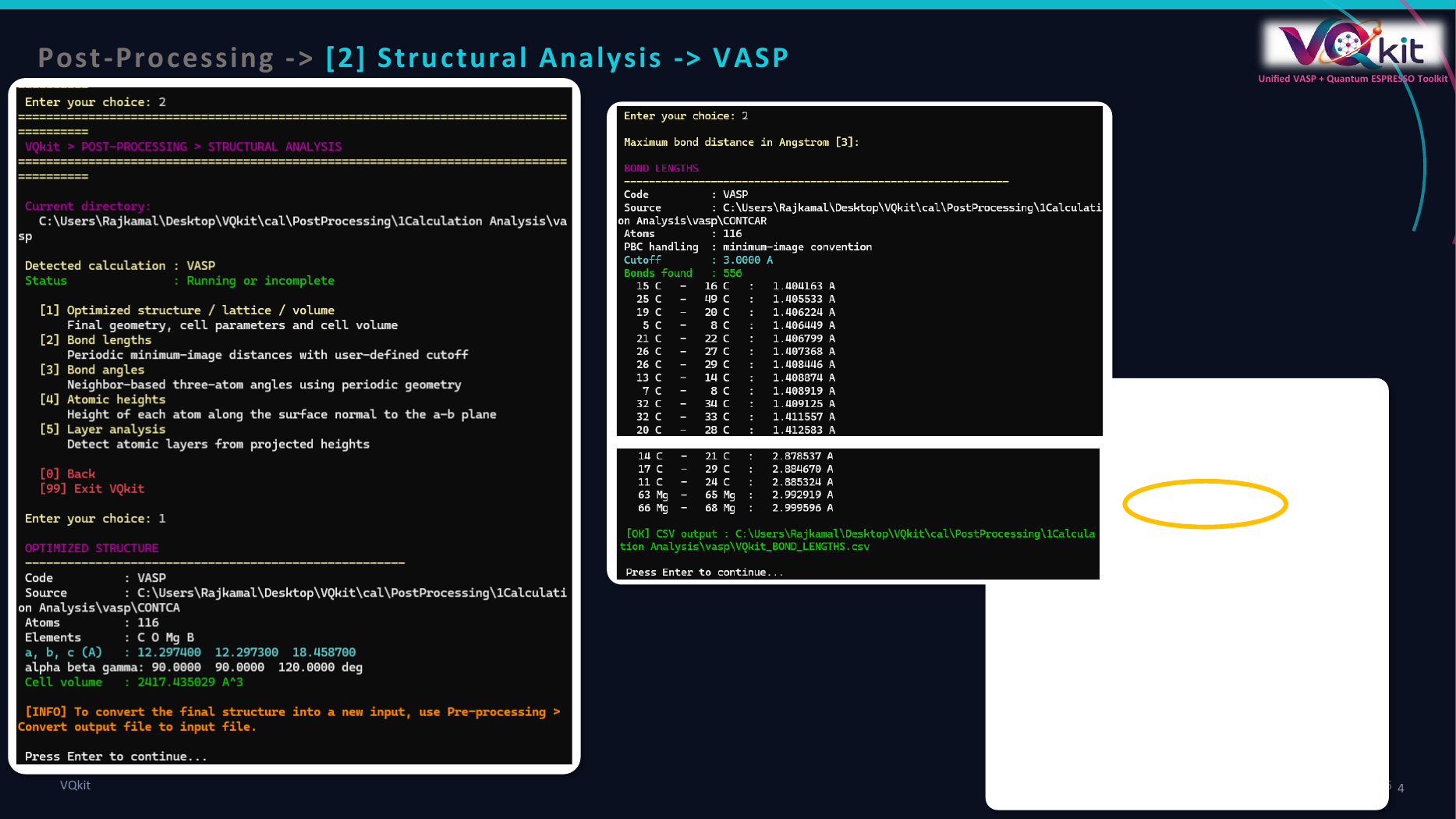
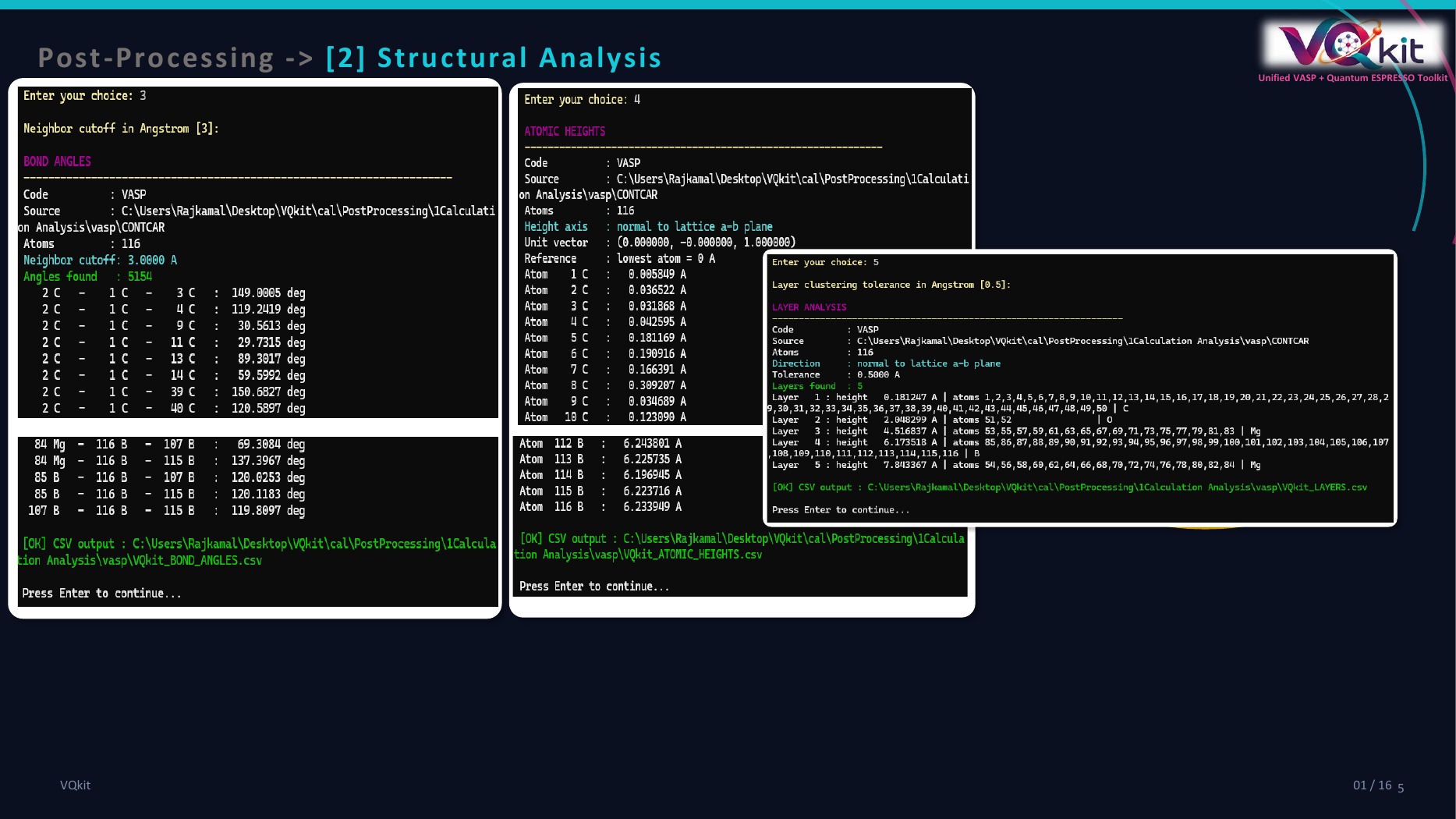
Additional structural outputs such as bond-angle and layer analysis are also demonstrated in the visual guide.
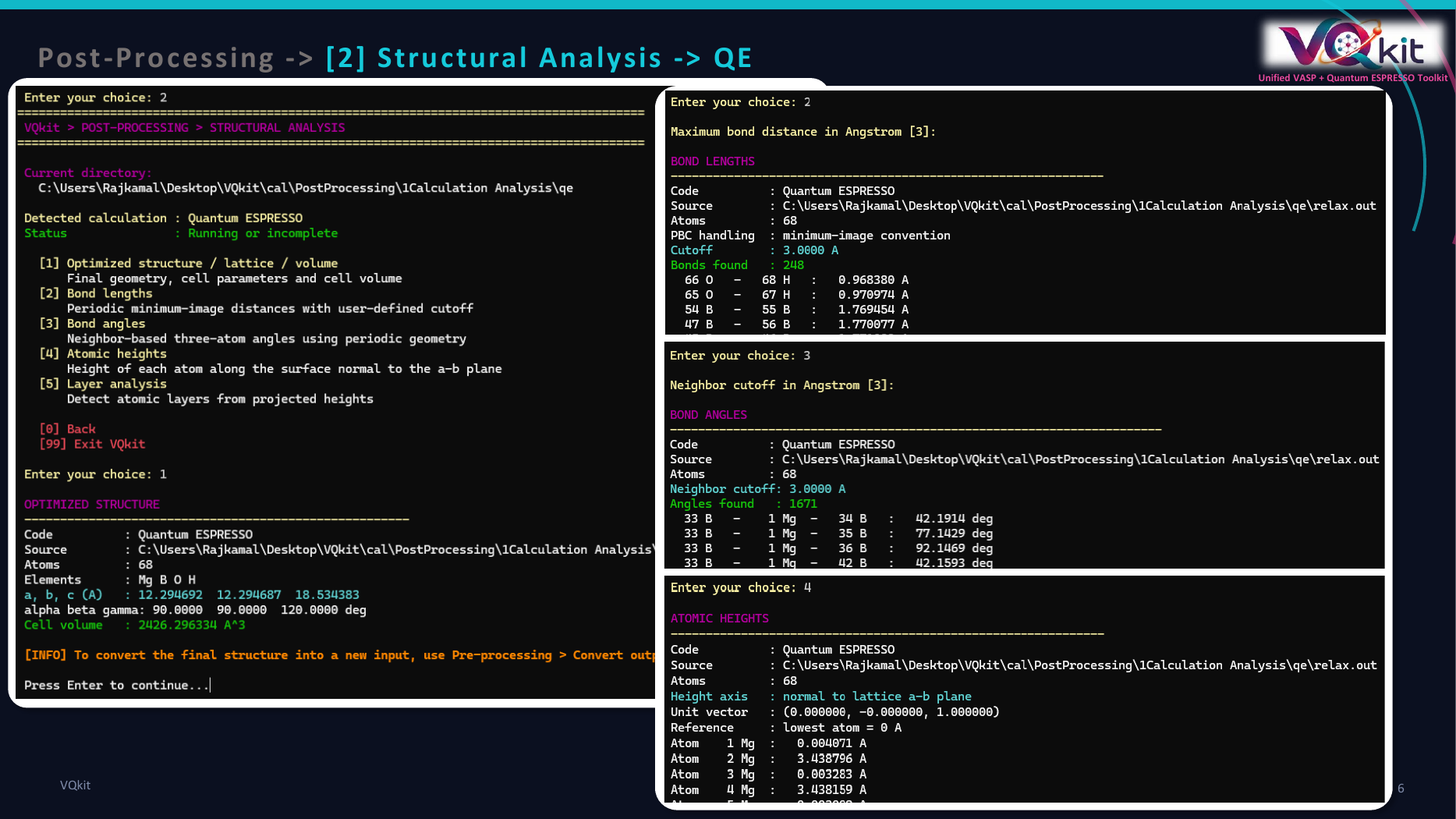
Quantum ESPRESSO example
Final-structure detection
VASP
For VASP, VQkit tries to obtain the final structure from:
CONTCAR
and then:
OUTCAR
The final structure is parsed into:
lattice;
atom positions;
species;
number of atoms.
If CONTCAR is present and readable, it is normally the preferred source.
Quantum ESPRESSO
For QE, VQkit searches available QE output files and parses the final structure from the latest readable output.
The final QE structure includes:
final cell;
final atomic coordinates;
atom labels;
number of atoms.
If no usable final VASP or QE structure is found, the structural analysis stops and reports an error.
Optimized structure / lattice / volume
The optimized-structure report summarizes the final cell.
VQkit reports:
Code
Source
Atoms
Elements
a, b, c
alpha, beta, gamma
Cell volume
Lattice-vector lengths
For lattice vectors:
VQkit computes:
The values are reported in:
Angstrom
Cell angles
The three conventional cell angles are calculated as:
The angles are reported in:
degrees
Cell volume
The final cell volume is obtained from the scalar triple product:
and reported in:
Angstrom^3
Representative output
A typical optimized-structure report may look like:
OPTIMIZED STRUCTURE
------------------------------------------------------

Code          : VASP
Source        : /path/to/CONTCAR
Atoms         : 24
Elements      : Fe O
a, b, c (A)   : 5.431200  5.431200  15.000000
alpha beta gamma: 90.0000  90.0000  120.0000 deg
Cell volume   : 383.452781 A^3
Converting the final structure to a new input
The structural-analysis report itself does not overwrite or generate a new input structure.
If the user wants to convert a relaxed structure into a fresh input, VQkit directs them to:
Pre-processing
-> Convert output file to input file
This separation keeps analysis and input generation distinct.
Bond-length analysis
The bond-length tool calculates pair distances up to a user-defined cutoff.
The default cutoff is:
3.0 Angstrom
VQkit asks:
Maximum bond distance in Angstrom [3]:
Periodic boundary conditions
Bond distances are calculated using a minimum-image treatment.
This is important because two atoms can be close across a periodic cell boundary even if their raw Cartesian coordinates appear far apart.
VQkit converts the atomic displacement into fractional coordinates and searches the local periodic images around the nearest fractional image.
A 27-image search is used around that nearest image.
This avoids common errors for bonds crossing cell edges.
Distance calculation
For atoms i and j, VQkit determines the shortest periodic vector:
and computes:
A pair is included when:
The list is sorted from shortest to longest bond.
Representative output
Example:
BOND LENGTHS
--------------------------------------------------------------

Code          : VASP
Source        : /path/to/CONTCAR
Atoms         : 24
PBC handling  : minimum-image convention
Cutoff        : 3.0000 A
Bonds found   : 48

   1 Fe  -    9 O   :   1.945218 A
   2 Fe  -   10 O   :   1.951782 A
   ...
CSV output
VQkit writes:
VQkit_BOND_LENGTHS.csv
The file contains:
atom1
species1
atom2
species2
distance
dx
dy
dz
The dx, dy, and dz fields are the components of the shortest
periodic displacement vector.
Choosing a bond cutoff
The default 3.0 Angstrom is only a convenient starting point.
The appropriate cutoff depends on:
element types;
expected coordination;
ionic radii;
covalent radii;
metallic bonding;
adsorbate-substrate distances.
For short covalent bonds, a smaller cutoff may be better.
For coordination environments involving larger atoms, a larger cutoff may be needed.
Bond-angle analysis
Bond angles are constructed from the neighbor map defined by the same distance cutoff.
The default neighbor cutoff is:
3.0 Angstrom
VQkit asks:
Neighbor cutoff in Angstrom [3]:
For each central atom, every unique pair of neighboring atoms defines one bond angle.
Geometry
For atoms:
atom1 - center - atom3
VQkit constructs two minimum-image vectors:
and:
from the central atom to the two neighbors.
The angle is:
and is reported in degrees.
Representative output
Example:
BOND ANGLES
----------------------------------------------------------------------

Code          : Quantum ESPRESSO
Source        : /path/to/relax.out
Atoms         : 12
Neighbor cutoff: 3.0000 A
Angles found   : 36

   2 O   -    1 Ti  -    3 O   :   92.3812 deg
   ...
CSV output
VQkit writes:
VQkit_BOND_ANGLES.csv
Columns include:
atom1
species1
center
center_species
atom3
species3
distance1
distance2
angle
The two distances are the center-to-neighbor distances used to construct the angle.
Atomic-height analysis
Atomic-height analysis is intended mainly for surfaces, slabs, layered materials, and adsorption geometries.
VQkit does not simply assume that Cartesian z is the surface-normal
direction.
Instead, it defines the height axis as the unit vector normal to the first two lattice vectors:
Each atom is projected onto this direction.
Projected coordinate
For an atomic position:
the projected coordinate is:
VQkit then shifts all values so that the lowest atom becomes:
0 Angstrom
Therefore the reported height is:
Representative output
Example:
ATOMIC HEIGHTS
--------------------------------------------------------------

Code          : VASP
Source        : /path/to/CONTCAR
Atoms         : 20
Height axis   : normal to lattice a-b plane
Unit vector   : (0.000000, 0.000000, 1.000000)
Reference     : lowest atom = 0 A

Atom    1 Pt  :   0.000000 A
Atom    2 Pt  :   0.012481 A
Atom    9 O   :   4.927315 A
...
CSV output
VQkit writes:
VQkit_ATOMIC_HEIGHTS.csv
Columns are:
atom
species
height
projected_coordinate
The height field is referenced to the lowest atom.
The projected_coordinate field retains the raw projection before shifting.
Layer analysis
Layer analysis groups atoms according to their height above the bottom of the structure.
The default clustering tolerance is:
0.50 Angstrom
VQkit asks:
Layer clustering tolerance in Angstrom [0.5]:
Clustering logic
Atoms are first sorted from lowest to highest height.
A new layer is started when the difference between an atom’s height and the current layer mean exceeds the chosen tolerance.
Otherwise the atom is added to the existing layer.
As atoms are added, the layer mean is updated.
This allows slightly buckled layers to be grouped together.
Representative output
Example:
LAYER ANALYSIS
------------------------------------------------------------------

Code          : VASP
Source        : /path/to/CONTCAR
Atoms         : 24
Direction     : normal to lattice a-b plane
Tolerance     : 0.5000 A
Layers found  : 4

Layer   1 : height   0.012345 A | atoms 1,2,3,4   | Pt
Layer   2 : height   2.231472 A | atoms 5,6,7,8   | Pt
Layer   3 : height   4.465091 A | atoms 9,10,11,12 | Pt
Layer   4 : height   6.217382 A | atoms 13,14      | O,H
CSV output
VQkit writes:
VQkit_LAYERS.csv
Columns are:
layer
height
count
atoms
species
Each row describes one detected layer.
Using layer analysis for slab systems
Layer analysis is useful for:
identifying surface layers;
measuring slab relaxation;
locating adsorbates;
comparing bottom and top surfaces;
checking buckling;
selecting layers for subsequent structure editing.
For example, if a metal slab has four substrate layers and an adsorbate layer, VQkit may report:
Layer 1 -> bottom substrate
Layer 2 -> lower-middle substrate
Layer 3 -> upper-middle substrate
Layer 4 -> surface substrate
Layer 5 -> adsorbate
The exact result depends on the tolerance.
Choosing the layer tolerance
The default:
0.50 Angstrom
works well for many mildly buckled slab layers.
Use a smaller tolerance when:
physically distinct layers are very close;
you need fine separation of buckled atoms.
Use a larger tolerance when:
atoms in the same nominal layer are strongly buckled;
small structural distortions split one physical layer into several groups.
Always inspect the reported atom indices and heights.
Example: analyze a relaxed VASP slab
Assume a completed VASP calculation contains:
CONTCAR
OUTCAR
Step 1
Open:
Post-processing
Structural analysis
Step 2
Run optimized structure analysis.
Inspect:
lattice constants;
cell angles;
volume.
Step 3
Run bond-length analysis.
Enter a cutoff such as:
3.0
Inspect:
VQkit_BOND_LENGTHS.csv
Step 4
Run bond-angle analysis with an appropriate neighbor cutoff.
Inspect:
VQkit_BOND_ANGLES.csv
Step 5
Run atomic-height analysis.
Inspect:
VQkit_ATOMIC_HEIGHTS.csv
Step 6
Run layer analysis.
Start with:
0.50 Angstrom
and adjust if the reported layers do not match the physical slab geometry.
Example: analyze a relaxed QE structure
Assume:
relax.in
relax.out
contains a completed QE optimization.
Open:
Post-processing
Structural analysis
VQkit reads the final structure from the QE output and applies the same geometry routines used for VASP.
This allows the user to compare structural descriptors using a consistent post-processing workflow across both codes.
Minimum-image convention
The minimum-image treatment used for bond lengths and bond angles is important for periodic systems.
Consider two atoms near opposite sides of a unit cell.
Their raw Cartesian separation may be large, but the physically nearest periodic images may be close.
VQkit searches periodic replicas around the nearest fractional displacement and selects the shortest vector.
This makes bond analysis suitable for typical primitive and conventional DFT cells.
Scientific cautions
Geometric cutoff is not a bond definition
VQkit identifies neighbors based on a distance cutoff.
A pair within the cutoff is not automatically a chemically bonded pair.
Bond interpretation should consider:
chemistry;
coordination;
electronic structure;
bond-order analysis where appropriate.
Bond angles depend on the cutoff
Changing the neighbor cutoff can change:
which atoms are treated as neighbors;
how many angles are generated;
which coordination polyhedra appear.
Use a physically justified cutoff.
Layer analysis assumes a-b is the surface plane
The height axis is normal to lattice vectors a and b.
This is appropriate when those vectors span the surface plane.
For unusual cell orientations, verify that this direction matches the intended surface normal.
Final structure may not be converged
VQkit analyzes the final available structure.
If the calculation did not converge, the geometric results may describe an unfinished configuration.
Run:
Post-processing
General calculation analysis
before relying on structural descriptors.
Cell changes matter
For variable-cell relaxations, the final lattice may differ significantly from the starting cell.
Use the final structure when reporting:
lattice constants;
angles;
volume;
bond lengths.
Recommended workflow
A practical structural-analysis sequence is:
Run
General calculation analysis.Confirm that the calculation completed successfully.
Run optimized structure analysis.
Inspect lattice constants and volume.
Run bond-length analysis with a justified cutoff.
Run bond-angle analysis if local coordination is relevant.
Run atomic-height analysis for slabs or layered systems.
Run layer analysis with an appropriate tolerance.
Export and inspect the CSV files.
Use visualization software to confirm important structural conclusions.
Generated files
The current structural-analysis module can generate:
VQkit_BOND_LENGTHS.csv
VQkit_BOND_ANGLES.csv
VQkit_ATOMIC_HEIGHTS.csv
VQkit_LAYERS.csv
These files are suitable for:
plotting;
spreadsheet analysis;
supplementary data;
comparison across structures;
automated downstream workflows.
Structural analysis in VQkit provides a common geometry-analysis layer for VASP and Quantum ESPRESSO while preserving the final calculation structure as the source of truth.